BMO HRM Payroll turns payslip distribution into employee self service. Staff can view, download and export payslips from PC, tablet or BizCloud App, while payroll data is supported by employee profiles, attendance, e-Leave, e-Claim and statutory settings.
Supports Malaysian payroll compliance with computerized PCB/MTD calculation and schedule-based calculation, helping HR reduce manual tax calculation mistakes.
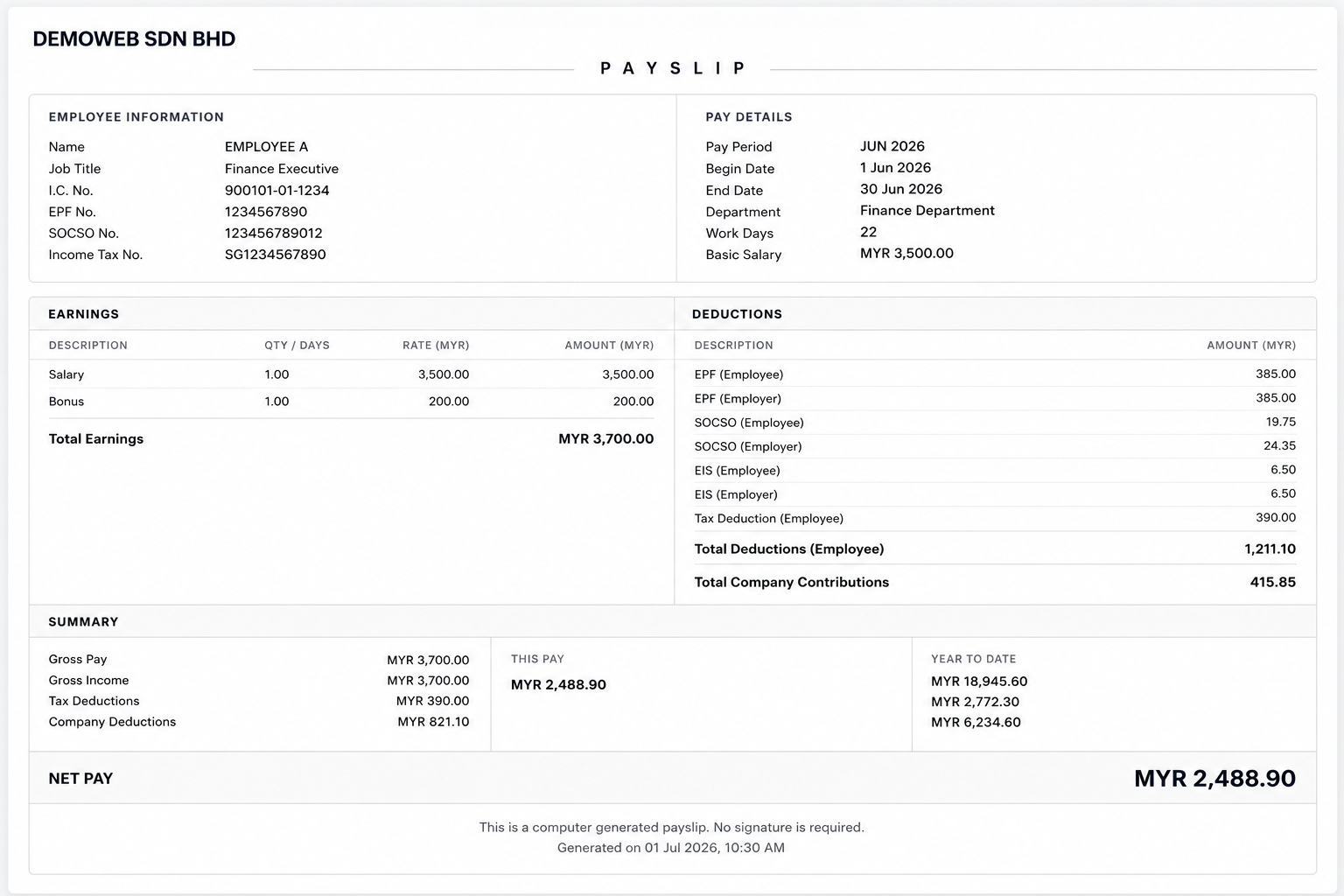
Employees can view, download and export their own digital payslips from PC, tablet or BizCloud App. HR reduces repeated WhatsApp, email and counter requests for payslip copies.
BMO HRM uses employee payroll profiles, preset salary, allowances, EPF/KWSP, SOCSO/PERKESO, EIS, PCB, SKBBK and deduction settings to reduce manual retyping and spreadsheet mistakes.
Approved unpaid leave can flow into payroll deduction, while approved claims can sync into payroll and appear in the payslip. HR saves time and reduces missed salary adjustments.
Keep pay period records, previous payslips, income and deduction history, year-to-date summary, EA form and payroll reports for management review, and dispute reference.
Stop making HR resend payslips every month. With BMO HRM Payslip Self Service, employees can view, download and export their own digital payslips from PC, tablet or the BizCloud App.
Employees can access their own payslip after payroll is generated. They can check net pay, gross income, deductions, employer contributions and payslip details without waiting for HR to send the document manually.
Payslip self service is available through employee login and the BizCloud App. This gives employees a convenient way to retrieve payroll information whether they are in the office, at a branch, on-site or working remotely.
HR no longer needs to print payslips, email PDF files one by one or respond to repeated WhatsApp requests. Employees can view or export their digital payslip whenever they need it.
After payroll is processed, HR often receives the same questions again and again: โCan you send my payslip?โ, โCan I get last monthโs payslip?โ, โWhy is my net pay different?โ, or โHow much was deducted for EPF, SOCSO, EIS, PCB or SKBBK?โ BMO HRM helps reduce this repetitive work by letting employees retrieve their own payslip records and salary breakdown through self service.
Business owners do not need to check every payroll formula personally, but they need a trusted system that supports Malaysian payroll compliance, reduces manual tax calculation mistakes and keeps every payroll cycle structured, easier to review.
BMO HRM Payroll is certified by LHDN Malaysia and supports computerized monthly income tax calculation for PCB/MTD. It also supports schedule-based calculation, helping HR reduce manual tax calculation errors and manage Malaysia payroll compliance with better confidence.
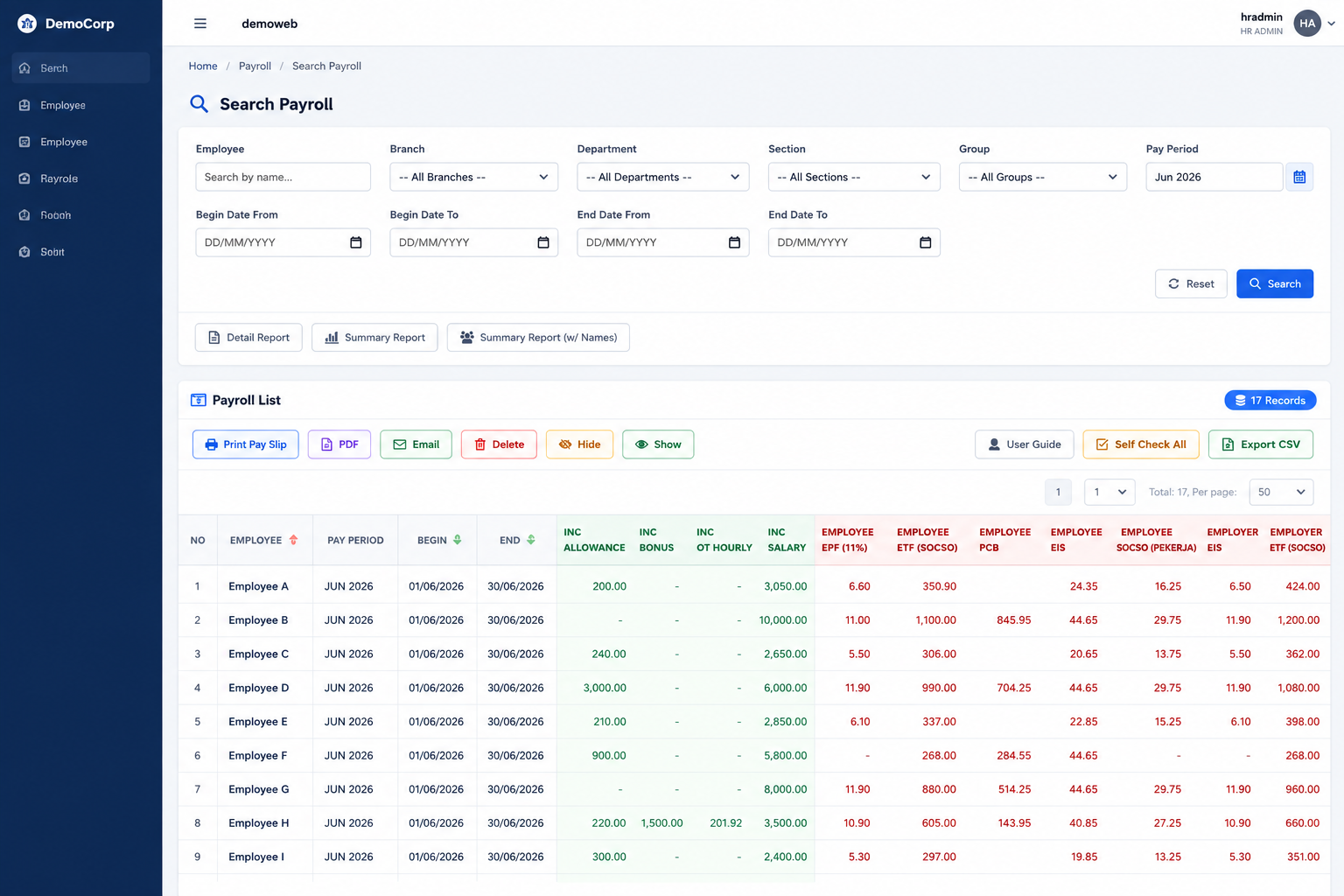
Generate payroll by selected employees, beginning date, end date and pay period. Preview mode helps HR check salary, allowance, deduction and statutory information before finalising payroll.
Set payroll calculation using 26 days, calendar days or work pattern working days so unpaid leave, salary deduction and daily rate calculation can follow your company practice.
Record previous employment income and PCB details for new employees so computerized PCB calculation has the correct transferred information and reduces manual checking mistakes.
Prepare payroll-related reports for filing and reference, including EPF Borang A, SOCSO Borang 8A, EIS report, PCB/CP39, EA form and CP8D.
Keep salary, allowance, advance pay and deduction changes traceable, reducing confusion during management review, employee salary enquiries and checking.
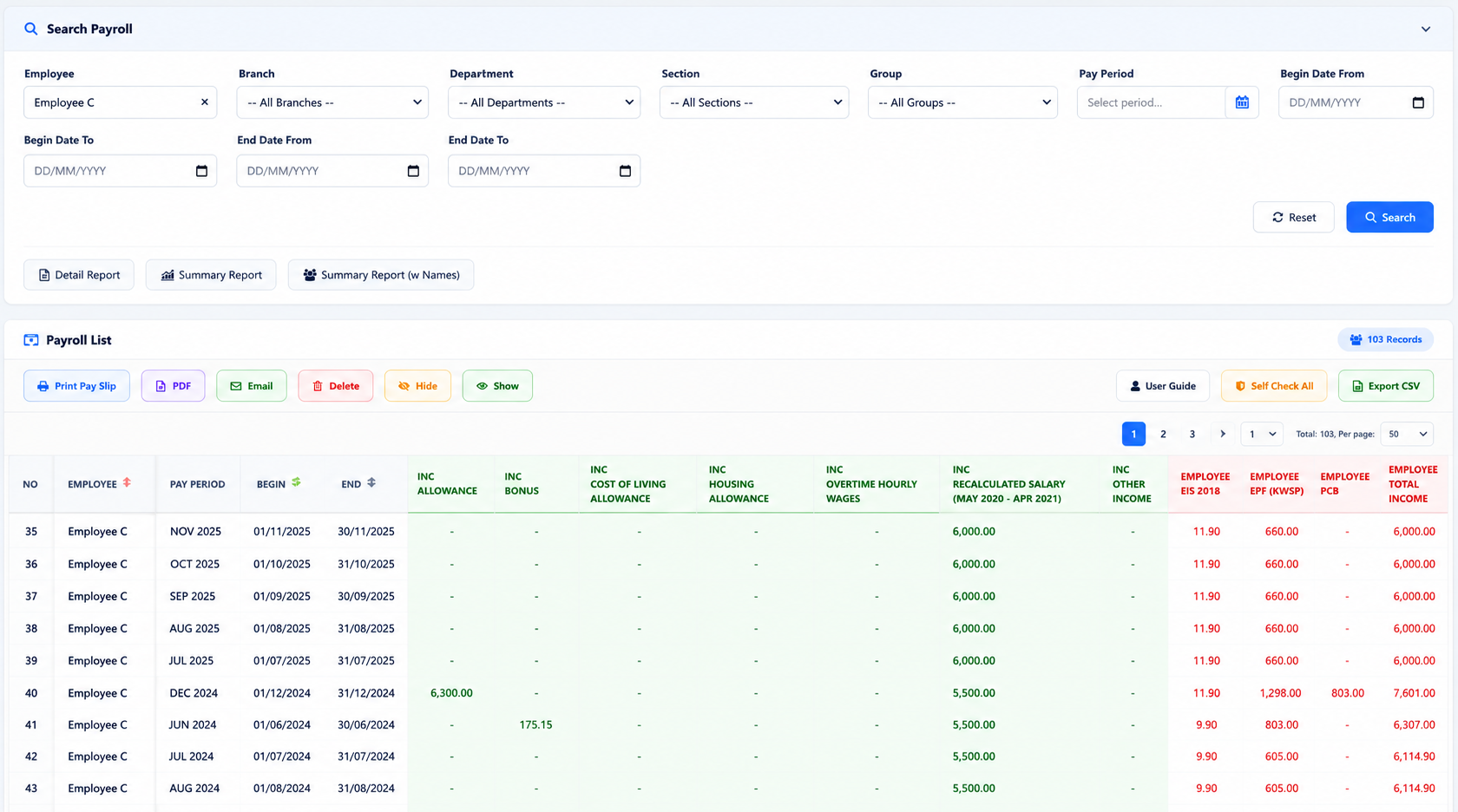
Payroll is not only about generating salary for the current month. HR also needs to answer employee enquiries, retrieve old payslips, check previous pay periods, review salary changes and prepare records for dispute situations. BMO HRM keeps payroll information more organised so HR can retrieve historical records without searching through scattered files, old emails or manual spreadsheets.
Employees and HR can refer to previous digital payslips when they need to check past salary, deductions, allowances, employer contributions or net pay information. This reduces repeated HR requests to resend old payslips by WhatsApp, email or printed copy.
Payroll records are organised by pay period, making it easier for HR to review each salary cycle, compare month-to-month payroll figures and trace what was processed for every employee in a specific month.
Year-to-date payroll information helps HR and management review accumulated earnings, deductions, employer contributions and payroll totals across the year. This is useful for annual checking, management reporting and employee tax preparation.
When salary, allowance, claim payment, advance pay or deduction settings change, the system keeps history for easier review. HR can understand what changed, when it changed and use the record as supporting reference during salary enquiries.
Generate EA forms using payroll records accumulated throughout the year. This supports annual employee tax reporting and helps HR reduce year-end preparation time, manual checking and repeated salary record compilation.
When there is a salary dispute, audit request or management enquiry, HR can refer to payroll history, payslip records, pay period reports, income changes and deduction records instead of rebuilding the information manually from scattered files.
BMO HRM Payroll uses preset employee, salary, contribution and deduction data to generate more consistent payroll results and digital payslips. This helps HR reduce repeated key-in, manual calculation mistakes and last-minute payroll checking.
Set company-level payroll information such as LHDN tax number, SOCSO, KWSP/EPF, HRDF or levy information to create a cleaner payroll foundation for Malaysian businesses.
Maintain employee payroll details such as EPF/KWSP number, SOCSO/PERKESO number, EIS, PCB, tax number, marital status, bank information and payroll table settings by employee.
Preset salary, allowances, EPF/KWSP, SOCSO/PERKESO, EIS, PCB, SKBBK, HRDF/levy where applicable and other deductions so payslip figures are generated from structured payroll settings instead of manual retyping.
Define salary, allowance, claim payment, advance pay, taxable settings, EA category, contribution flags and deduction rules so payroll calculation can follow your company policy more consistently.
After payroll is processed, employees can view and download their digital payslip from PC, tablet or BizCloud App. HR does not need to manually print, email or resend payslip PDF files every month.
Approved unpaid leave from e-Leave and approved claims from e-Claim can flow into payroll, helping HR reduce duplicate entry and missed payroll adjustments.
Keep salary changes, income changes, deduction records and payroll history easier to retrieve for management review, employee enquiries, checking and dispute reference.
Prepare payroll documents for monthly and yearly filing reference, including EPF Borang A, SOCSO Borang 8A, EIS report, PCB/CP39, EA form and CP8D.
BMO HRM provides specific payroll and HR features that reduce manual work in daily operation.
| Business Problem | BMO HRM Feature | How It Helps |
|---|---|---|
| Payroll errors from wrong statutory settings | Employee Payroll Info + Company Payroll Setting | Store EPF No, SOCSO No, income tax number, EPF table, SOCSO table, EIS table, PCB table, marital status and default payroll rates in a structured setup. |
| Manual unpaid leave deduction | e-Leave to Payroll Integration | When unpaid leave is approved, payroll can reflect the deduction using the companyโs selected payroll days calculation method. |
| Claim payment entered twice | e-Claim to Payroll + Auto Claim Payment | Approved claims can be linked to income type, synced into payroll and shown in the employee payslip without duplicate entry. |
| Employees keep asking HR for payslip | Employee Self Service | Employees can login to access their own HR records and payslip-related information based on company permission. |
| Month-end payroll takes too much manpower | Create Payroll Preview / Background | HR can generate payroll by selecting employees, date range and pay period, then review before final processing. |
| Different companies use different daily rate methods | Payroll Days Calculation | Choose 26 days, calendar days or work pattern working days to match company calculation practice. |
| Filing statutory documents takes time | Payroll Reports | Generate payroll-related documents and reports such as EPF Borang A, SOCSO Borang 8A, EIS report, PCB/CP39, EA form and CP8D for filing reference. |
Payroll is not just salary. HR must check attendance, unpaid leave, claims, deductions, employee status, statutory settings and reports. When every item is handled separately, mistakes become easier to happen.
A connected payroll workflow gives the owner, HR manager and payroll user better control before salary is released.
Let our team show you how BMO HRM Payroll connects employee profile, e-Leave, e-Claim, attendance, payroll settings and reports into a more controlled payroll workflow.
Request Payroll Demo Start Free Trial
Payroll becomes easier to process when salary-related HR data is already captured before month-end. BMO HRM connects employee profile, e-Leave, e-Claim and attendance records so HR can reduce repeated checking, duplicate entry and missed payroll adjustments.
Employee records, department, employment status, bank information, salary setup, statutory numbers and payroll table settings are stored in one place, giving payroll users a cleaner foundation before salary processing starts.
Approved unpaid leave and payroll-related leave records can flow into payroll calculation. This helps HR reduce missed salary deductions, manual daily-rate calculation and last-minute checking from leave forms or spreadsheets.
Approved claims can be linked to payroll income types and reflected in payroll or payslip. HR does not need to key in the same claim amount again after approval, reducing duplicate entry and claim payment mistakes.
Attendance records, work pattern, overtime, absence, lateness and monthly workday summary support payroll checking. HR can review attendance-related payroll items with clearer records before finalising salary.
Show employees and payroll users a clearer mobile view of payslip PDF, payroll detail summary, payroll analytics and past pay period records.
Employees can preview a computer-generated payslip PDF on mobile, making it easier to check salary information without requesting another copy from HR.
The payroll detail screen shows salary breakdown, earnings, deductions, employee information and employer contribution details in a structured mobile view.
Payroll analytics and pay period listing help users compare net pay, gross income, deductions and previous payroll records more visually.
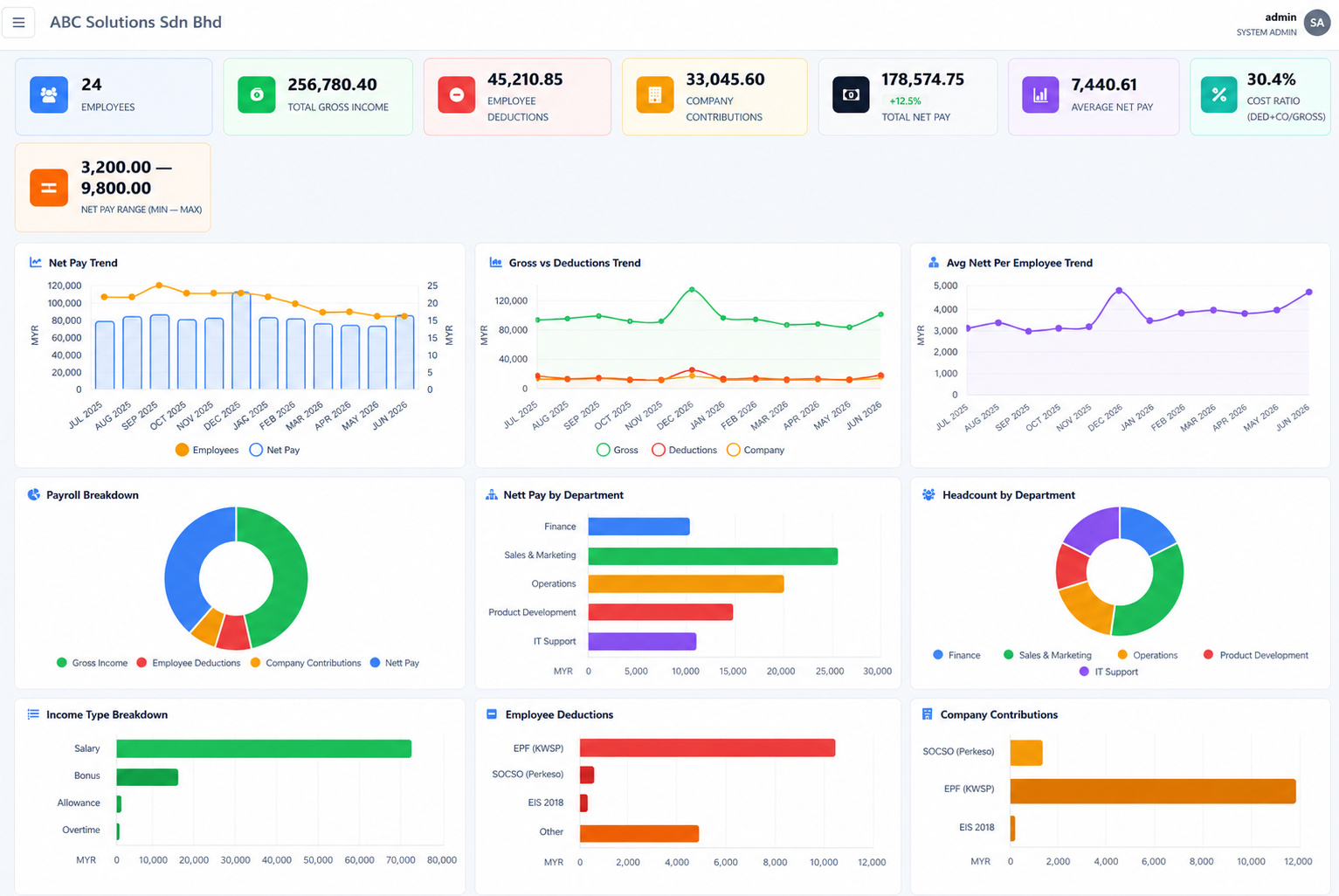
Payroll is not only for paying employees. Business owners and HR managers also need clear reports to understand payroll cost, salary movement, deductions, employer contributions and department-level manpower expenses.
Review payroll cost by department, branch or employee group so management can understand where salary expenses are coming from. This helps business owners monitor manpower cost more clearly instead of depending only on total monthly payroll figures.
Compare gross income, total deductions and net pay to understand the actual salary amount paid to employees. This gives HR and management a clearer view of payroll movement before and after deductions are applied.
View payroll deductions such as EPF/KWSP, SOCSO/PERKESO, EIS, PCB, SKBBK, HRDF/levy where applicable and other employee deductions. This helps reduce confusion when employees ask about salary differences or deduction details.
Track employer-side contributions such as EPF/KWSP, SOCSO/PERKESO, EIS and other applicable company contributions. This helps management understand the true employment cost beyond basic salary and allowances.
Review overtime, allowances, claim payments and other payroll additions more systematically. This helps HR identify unusual payroll items, control recurring allowance costs and support management approval with clearer records.
Year-to-date reporting helps HR and management review accumulated salary, deductions, employer contributions and payroll totals across the year. This is useful for annual checking, EA form preparation and management review.
Reports can be exported to Excel or PDF where available, helping HR reduce manual report preparation and giving business owners clearer payroll visibility without waiting for spreadsheet consolidation.
Monitor salary, allowance, deduction and contribution figures more clearly.
Review payroll cost by department, branch or employee group.
Track accumulated payroll figures for annual checking and reporting.
Use exported reports for checking, filing, reference and management review.
BMO HRM Payroll is suitable for SMEs, growing companies, branches, franchises, service teams, operations companies and group companies that want better payroll control without adding more HR headcount.
BMO HRM is suitable for businesses that manage multiple branches, outlets, subsidiaries or related companies. Instead of handling payroll records separately in different spreadsheets, management can use one HRM platform to organise employee records, payroll history, payslip access, claims, leave, attendance and statutory payroll information across the business.
Branch employees can submit leave, claims and attendance records through the system, while HQ payroll users can review cleaner payroll-related data before processing salary.
Businesses managing more than one company can benefit from a more structured HRM platform where payroll records, employee profiles and reports are easier to manage and retrieve.
Franchise and outlet teams often need consistent payroll rules, payslip access and employee records. BMO HRM helps reduce scattered payroll handling across different locations.
Common questions from business owners, HR teams and payroll users.
BMO HRM Payslip Self Service allows employees to view, download and export their own digital payslips from PC, tablet or BizCloud App. This reduces repeated HR requests for payslip PDFs, old salary records, salary breakdowns and printed payslips.
BMO HRM Payroll reduces payroll error by centralising employee payroll information, income and deduction settings, EPF/KWSP, SOCSO/PERKESO, EIS, PCB, SKBBK, HRDF or levy setup, leave deduction, claim payment and payroll reports in one system.
Yes. BMO HRM Payroll supports Malaysian payroll requirements and is certified by LHDN Malaysia. It supports computerized monthly tax deduction calculation for PCB/MTD and schedule-based calculation, helping HR reduce manual tax calculation mistakes.
Yes. When e-Leave is connected with payroll, approved unpaid leave and payroll-related leave records can be reflected in payroll calculation. The system can calculate daily rate based on the payroll days calculation method selected by your company.
Yes. Claim types can be linked to payroll income types. After approval, the claim amount can sync into payroll and be displayed in the payslip, reducing duplicate entry and missed claim payment adjustments.
Yes. Employees and HR can refer to previous digital payslips and pay period records when they need to check past salary, deductions, allowances, employer contributions or net pay information.
BMO HRM supports payroll calculation based on 26 days, calendar days or work pattern working days. This helps companies choose the method that fits their internal payroll policy.
BMO HRM Payroll can prepare payroll-related reports and documents for monthly checking, statutory filing reference and year-end processing, including EPF Borang A, SOCSO Borang 8A, EIS report, PCB/CP39, EA form and CP8D.
Yes. BMO HRM supports employee login, role-based access, company permission control, BizCloud App access and device ID control so users only access the payroll and HR information allowed by the company.
Yes. BMO HRM is suitable for businesses with branches, outlets, franchise operations, subsidiaries or group companies that need cleaner payroll records, employee profiles, payslip access, leave, claims, attendance and statutory payroll information in a more organised platform.
BMO HRM helps management review payroll cost, department-level payroll expenses, gross pay versus net pay, deduction summary, employer contribution summary, year-to-date payroll information and exportable payroll reports for checking, filing and management review.
Yes. Employees can login to the system or BizCloud App based on company permission. They can apply leave, submit claims, clock attendance and access payroll-related information such as payslip self service where enabled.
Worried about setup work? Our team can guide your HR and payroll users through a structured onboarding flow, from employee profile preparation to payroll settings, module activation, user training and employee self service.
Prepare employee records, department, employment status, salary information, bank details and statutory numbers so payroll users can work from cleaner employee data instead of scattered spreadsheets.
Configure company payroll settings such as EPF/KWSP, SOCSO/PERKESO, EIS, PCB/MTD, HRDF or levy, payroll days calculation, income types, deduction rules and EA form categories.
Activate payroll, e-Leave, e-Claim and attendance modules based on your company workflow so approved leave, claims and attendance records can support month-end payroll checking.
Guide HR, payroll users, managers and admin users on payroll preview, approval flow, report retrieval, payslip access, role permission and daily HRM operation.
Employees can login through web access or BizCloud App to apply leave, submit claims, clock attendance and view payslip information where enabled, reducing repeated HR counter enquiries.
Let our team show how BMO HRM can reduce payroll checking work, improve payslip self service and support your HR workflow.
Request Payroll Demo Start Free Trial