Home > eLeave > eLeave Self Service

eLeave Self-Service for Employees

Employees apply, check and manage leave by themselves from PC or BizCloud App.

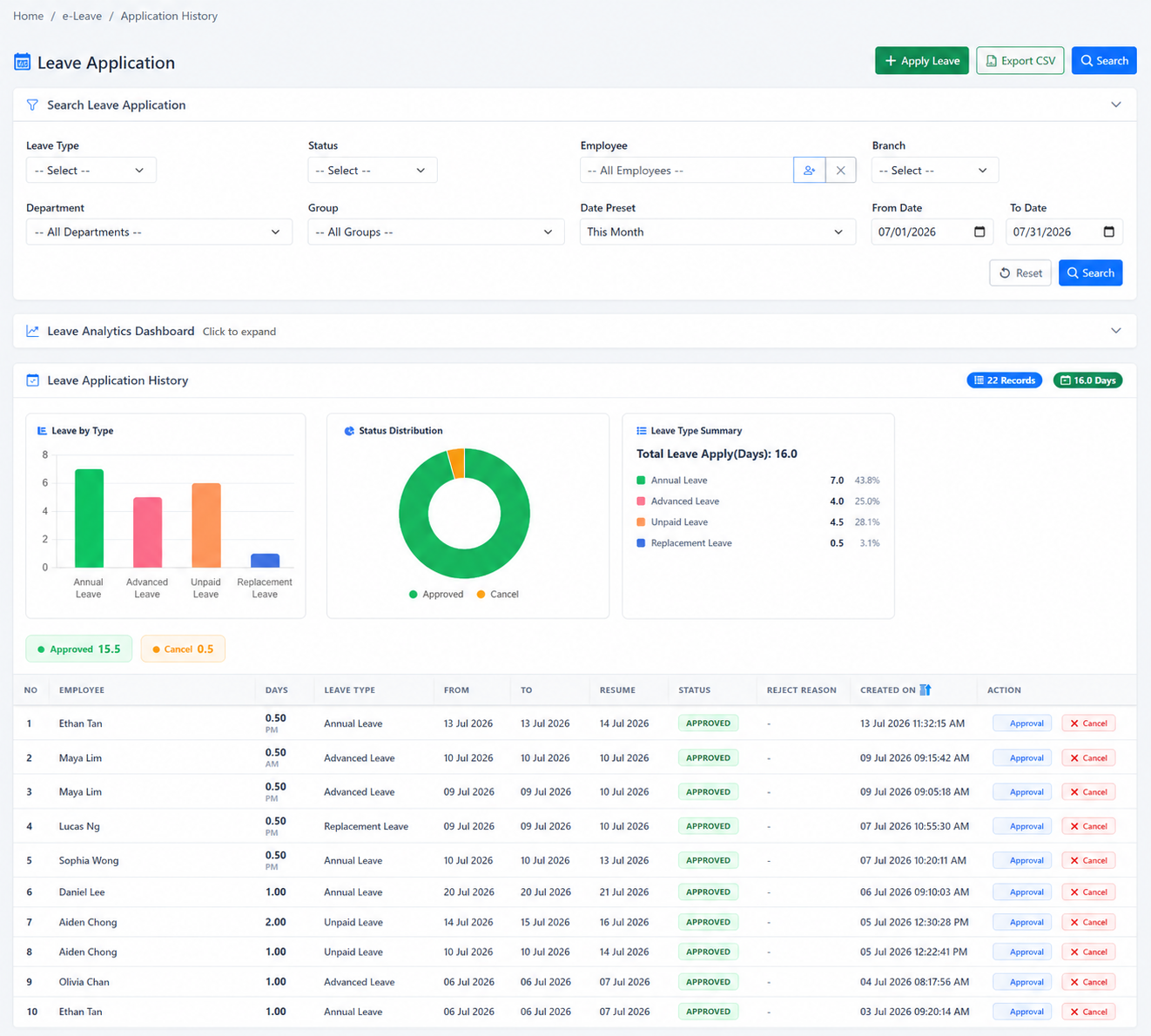
BMO HRM eLeave Self Service helps HR reduce repeated leave balance questions, manual leave forms, document chasing and approval follow-up. Employees can apply leave, check leave balance, upload MC, track approval status and view leave history online.

BMO HRM eLeave self service employee applying leave from web and BizCloud App
📱

Apply Leave Anytime

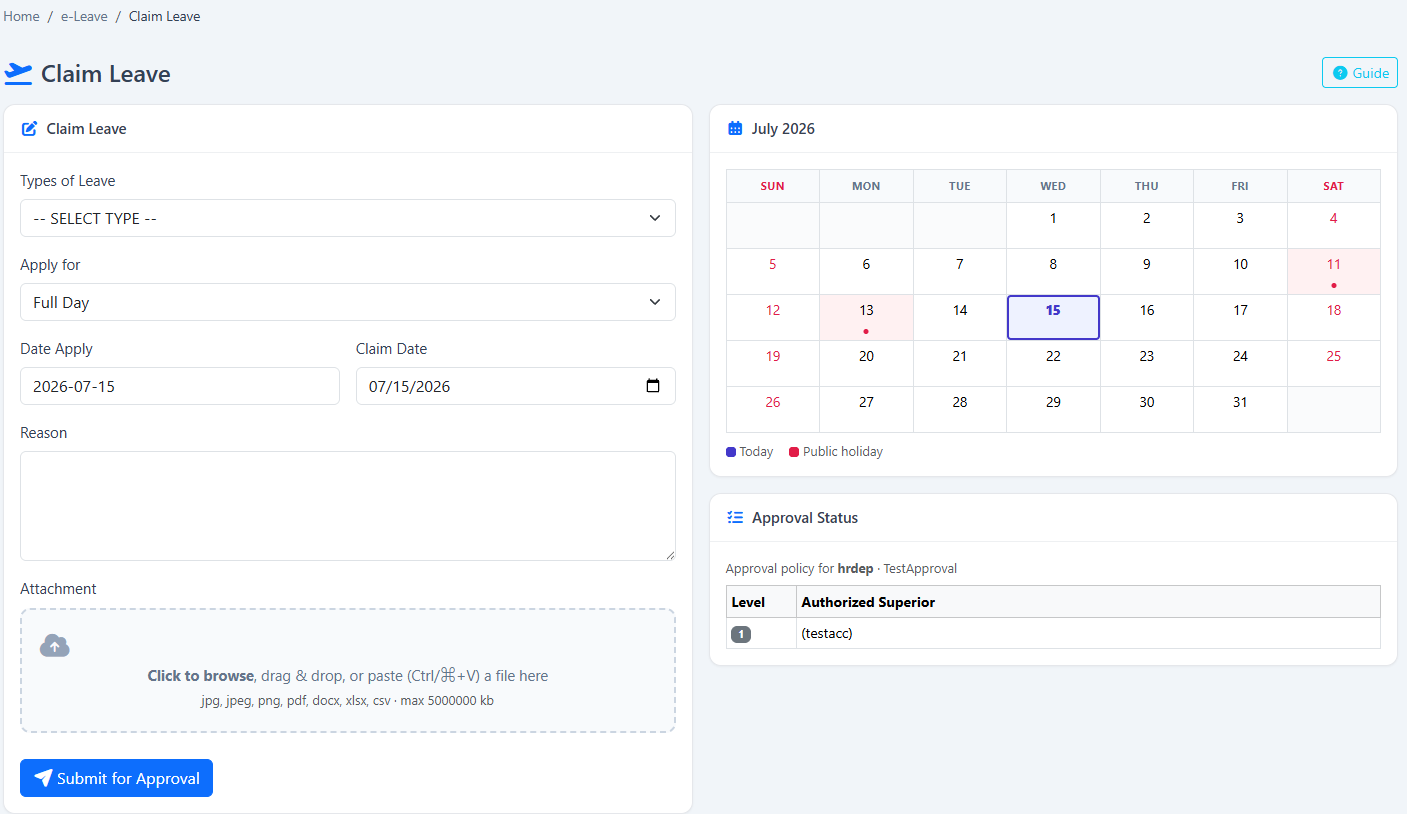
Employees can submit annual leave, sick leave, unpaid leave or other leave types from PC, tablet or BizCloud App.

🧮

Check Leave Balance

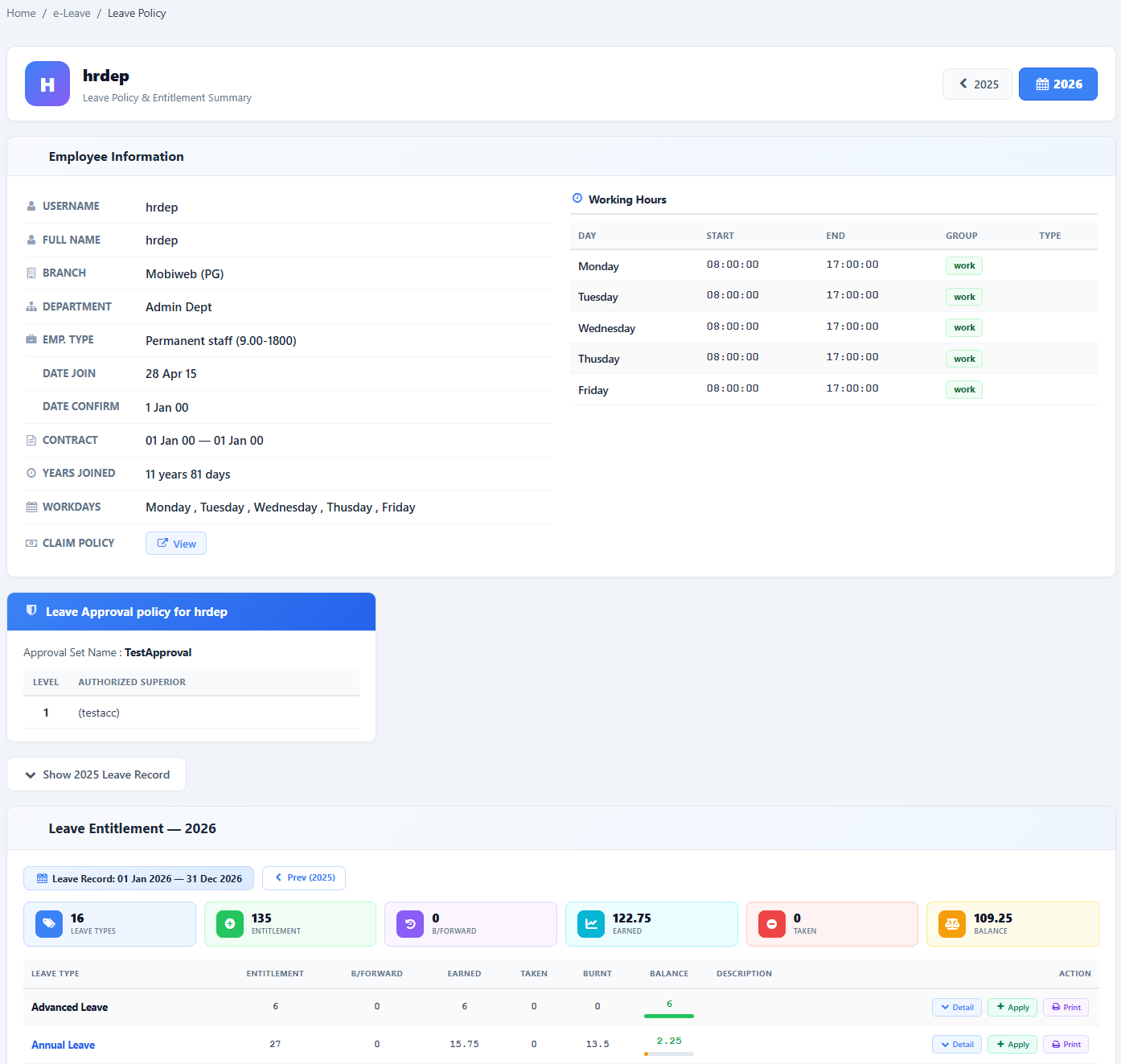
No need to ask HR how many days are left. Employees can view their own leave entitlement, balance and leave policy.

📎

Upload MC & Documents

Employees can attach MC, photo or supporting documents during leave application for easier manager review.

Track Approval Status

Employees can see whether leave is pending, approved or rejected without chasing HR or supervisors.

🔄

Unpaid Leave to Payroll

Approved unpaid leave can be reflected in payroll deduction, reducing manual calculation and salary adjustment mistakes.

What Employees Expect from eLeave Self Service

Management does not only want another HR admin screen. They want employees to handle daily leave tasks themselves, while HR keeps clearer records and fewer repeated questions.

📝

Online Leave Application

Employees can apply for leave directly online instead of filling paper forms, sending WhatsApp messages or asking HR to submit on their behalf.

🌗

Full Day or Half Day

Support flexible leave application for full day or half day leave based on company policy and leave type setup.

📊

Leave Policy Visibility

Employees can check their own leave balance and leave policy before applying, reducing “how many days left?” enquiries to HR.

📂

Supporting Documents

For sick leave, emergency leave or special leave, employees can upload supporting documents during the application process.

🔔

Approval Status Online

Employees can track whether leave is pending, approved or rejected, reducing daily follow-up messages to HR and supervisors.

🗓️

Leave Calendar & History

Approved leave and leave history can be referenced later, helping employees, managers and HR check past records more easily.

Reduce HR Leave Admin Work

Leave self service helps HR move from manual checking to a more structured leave workflow. Instead of answering the same leave questions every day, HR can focus on review, policy and payroll accuracy.

  • Reduce manual leave form collection and filing.
  • Reduce repeated leave balance questions from employees.
  • Reduce missing MC or supporting document follow-up.
  • Reduce approval status chasing between staff, HR and supervisors.
  • Keep leave application history easier to retrieve for checking reference.
  • Support branch, outlet and mobile employees with online leave submission.

Payslip Self Service + eLeave Self Service = Less HR Work

eLeave self service becomes stronger when connected with payroll and payslip self service. Employees apply leave online, managers approve online, approved unpaid leave supports payroll deduction and employees later view their digital payslip from PC or BizCloud App. This creates a clearer flow from leave request to salary calculation.

Apply Leave → Approval → Payroll Calculation → Digital Payslip

Show management the full daily-use flow. This is where eLeave self service becomes valuable for employees, supervisors and payroll users.

1

Employee Applies Leave

Employee submits annual leave, sick leave, unpaid leave or other leave type from PC or BizCloud App.

2

Supervisor Approves

Supervisor checks leave balance, supporting documents and team availability before approving or rejecting.

3

Payroll Uses Leave Data

Approved unpaid leave can be reflected in payroll deduction, reducing manual adjustment and calculation mistakes.

4

Employee Views Payslip

After payroll is ready, employee can view digital payslip from PC or BizCloud App where enabled.

Connect Leave Records to Payroll With Less Manual Checking

When unpaid leave is handled manually, payroll users may miss deductions or calculate them late. BMO HRM helps keep approved leave records organised so payroll users have a clearer reference before salary processing.

Employee applies unpaid leave online
Manager approves through workflow
Payroll user reviews approved leave record
Payslip reflects salary calculation where enabled

Best for Companies That Want Cleaner Leave Control

BMO HRM eLeave Self Service is suitable for SMEs, branches, outlets, service teams and group companies that want employees to manage leave requests online instead of relying on manual HR follow-up.

🏢

Branch & Outlet Teams

Branch staff can apply leave online while HQ HR and managers review leave records in a more organised system.

👥

Growing HR Teams

HR teams can reduce repeated leave balance checking, approval follow-up and manual leave filing as employee count grows.

💼

Payroll-Linked Companies

Companies that need unpaid leave to support payroll calculation can reduce salary adjustment mistakes and month-end checking work.

BMO HRM eLeave Self Service FAQ

Common questions from business owners, HR teams, payroll users and employees.

What is eLeave Self Service in BMO HRM?

BMO HRM eLeave Self Service allows employees to apply leave, check leave balance, upload documents, track approval status and view leave history from PC or BizCloud App.

Can employees apply leave from mobile phone?

Yes. Employees can submit leave applications from web access or BizCloud App, depending on company permission and setup.

Can employees check their own leave balance?

Yes. Employees can view their leave entitlement, remaining leave balance and leave policy information online, reducing repeated questions to HR.

Can employees upload MC or supporting documents?

Yes. Employees can upload MC, photo or supporting documents during leave application, making sick leave and special leave submission easier to review.

Does BMO HRM support full day and half day leave?

Yes. Employees can apply for full day or half day leave based on company policy and leave type setup.

Can employees track leave approval status?

Yes. Employees can see whether their leave application is pending, approved or rejected, reducing the need to chase HR or supervisors.

Can employees view leave application history?

Yes. Employees and HR can refer to previous leave applications and approval records for checking and future reference.

Does BMO HRM have a leave calendar?

Yes. Approved leave can be shown in a leave calendar to support team planning, shift planning and management visibility.

Can approved unpaid leave link to payroll?

Yes. Approved unpaid leave can be reflected in payroll calculation, helping HR reduce manual deduction work and payroll mistakes.

How does eLeave Self Service reduce HR workload?

It lets employees apply leave, check balance, upload documents and track status themselves instead of asking HR to handle every leave request manually.

Is eLeave Self Service suitable for branches and mobile teams?

Yes. Branch employees, outlet staff, mobile teams and office employees can submit leave online so HQ and managers have cleaner records for review.

How does eLeave connect with payslip self service?

The workflow can connect from leave application to approval, then approved unpaid leave can support payroll calculation. After payroll is ready, employees can view digital payslip.

Ready to Reduce Manual Leave Work?

Let our team show how BMO HRM eLeave Self Service can help employees manage leave online, reduce repeated HR questions and support payroll checking for approved unpaid leave.

Request eLeave Demo Start Free Trial