BMO HRM eClaim lets employees submit claim applications from PC or BizCloud App, attach receipts, track approval status and keep claim history. Once approved, claims can be linked to payroll income type and displayed in payslip, helping HR and payroll teams reduce repeated data entry and claim payment mistakes.
Employees can submit claims using web access or BizCloud App on iOS and Android where the eClaim module is activated.
Claim type can require attachment, helping employees submit receipt, invoice, photo or supporting document together with the claim.
Approved claims can link to payroll income type and show in payroll or payslip, reducing duplicate entry by HR.
The best marketing angle is simple: employees no longer need to pass paper receipts manually or keep asking HR for claim status. They can submit, check and reuse claim records by themselves.
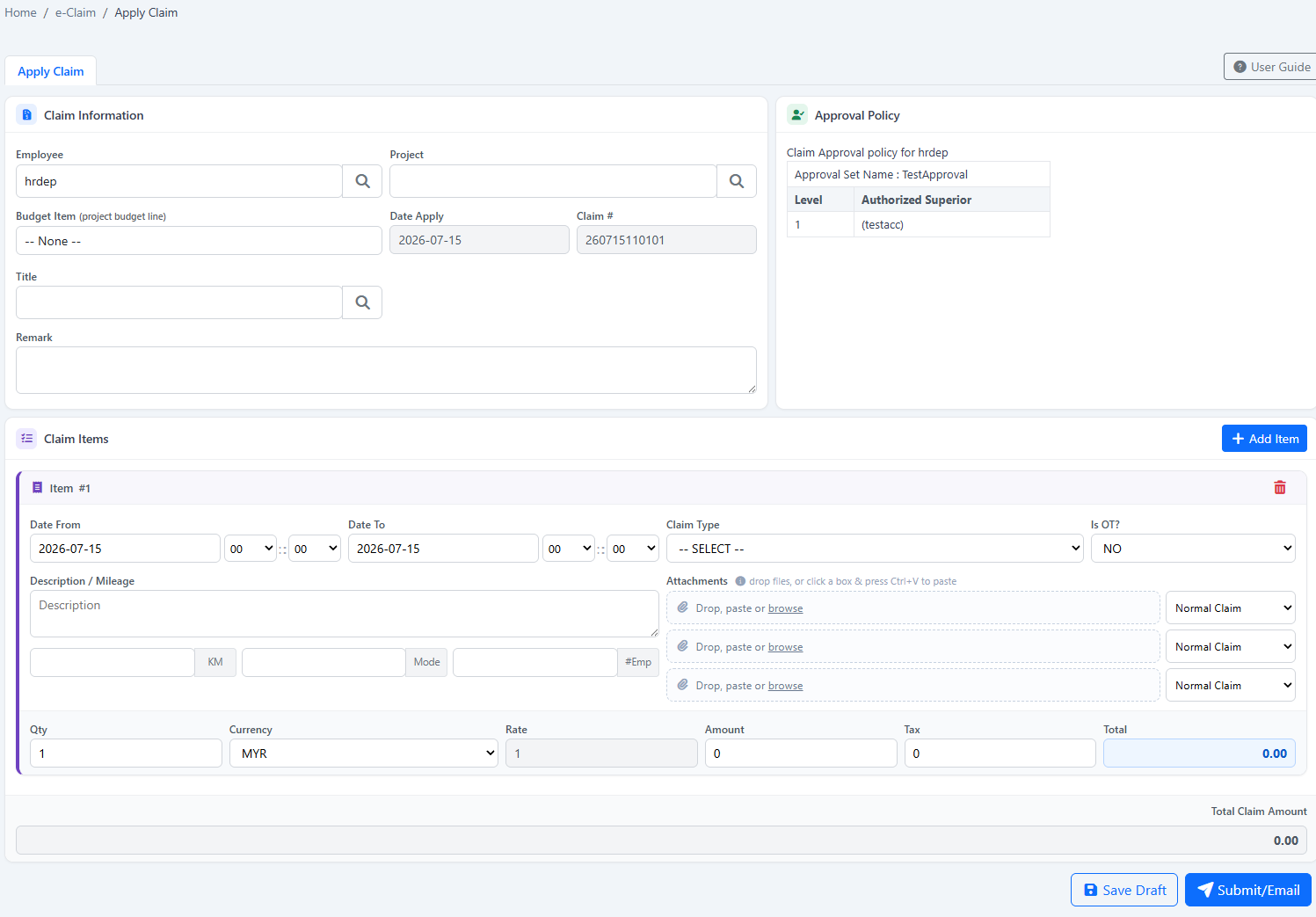
Employees select a project, enter a title, add claim rows, choose claim type, insert details and submit for approval from web, iOS or Android.
Receipts and documents can be attached during submission. If the claim type is set as attachment required, the employee must upload proof before submission.
Employees can view approval table, approvers and decision status, making it easier to know whether the claim is pending, approved or rejected.
My e-Claim shows claim list, claim details, PDF form and application history for record reference, checking and future enquiry.
For recurring expenses, employees can clone previous claim details to save time and reduce repeated typing.
Claims can be cancelled, edited or resubmitted based on status and company permission, reducing manual follow-up work.
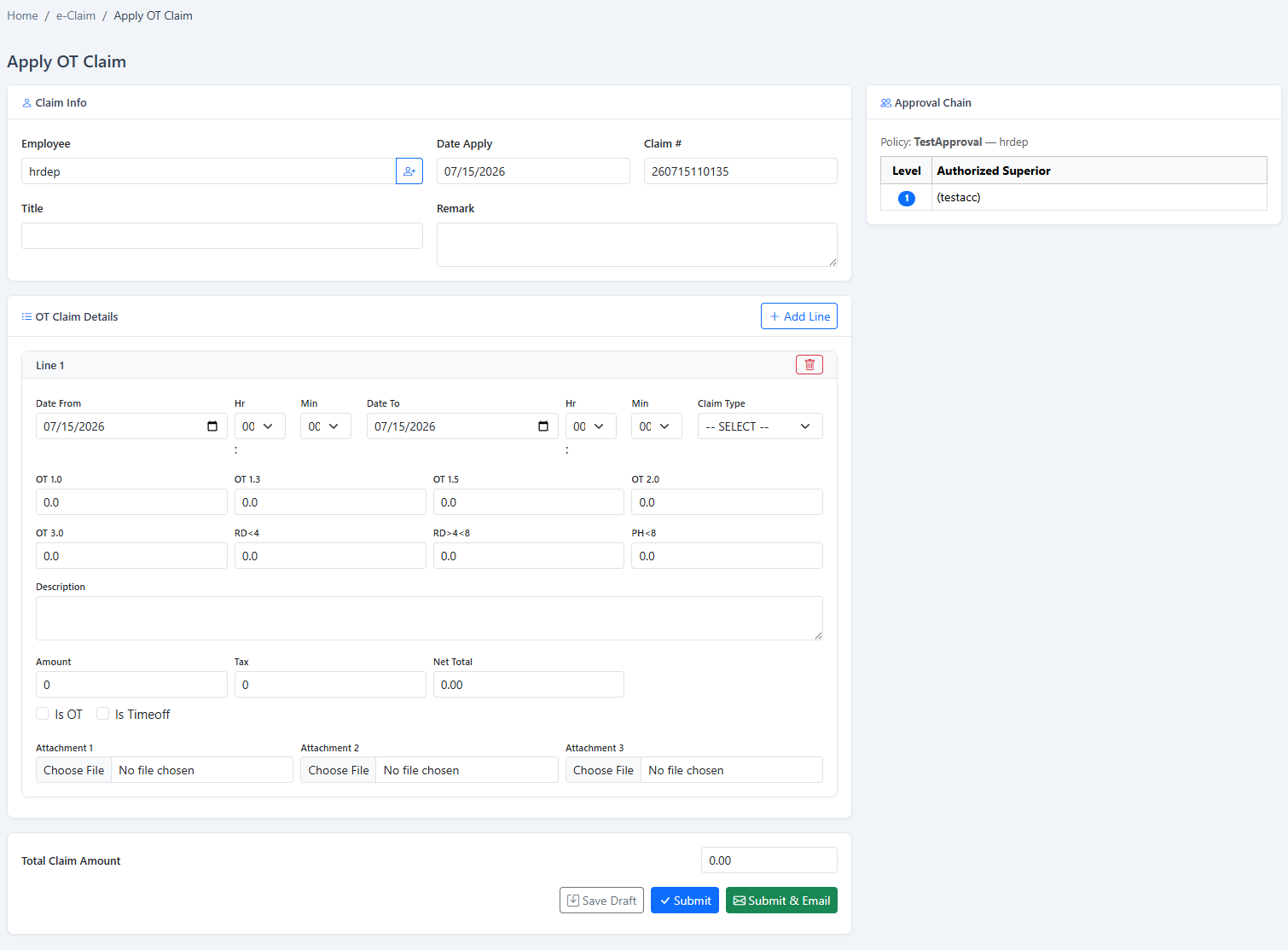
Employees who need to apply for overtime claim can fill in the OT claim form and submit it for approval.
When claim payment is linked to payroll, approved amounts can appear in payroll and payslip, making the payment reference clearer for employees.
Position this page around daily HR pain points. The stronger message is not only “online claim”, but “claim policy, approval, payroll and payslip connected in one workflow”.
| Business Problem | BMO HRM eClaim Feature | How It Helps HR, Finance and Employees |
|---|---|---|
| Employees submit receipts manually through WhatsApp, email or paper | Web and BizCloud App claim submission with attachment | Employees submit claim details and proof in one application, reducing missing receipts and scattered conversations. |
| Different claim types follow different company rules | Claim type setup with default amount, default selection, attachment rule and GL account | HR can standardise common claim categories such as travel, allowance, communication, office supplies or training expenses. |
| Employees do not know whether claim limit is exceeded | Claim cap by month or year under employee type | Companies can control claim entitlement based on policy, employee type or employment category. |
| Claim approval depends too much on manual checking | Claim approval set and multi-level approval matrix | Claims are routed according to the assigned approval flow, including AND or OR approval logic for more flexible management workflow. |
| Managers approve without seeing enough details | Claim approval page with policy, attachment, approval table and detail view | Approvers can review claim type, amount, attachment and claim history before making a decision. |
| Payroll needs to key in approved claim again | Claim to payroll income type mapping | Approved claim amount can flow into payroll and payslip, reducing duplicate entry and missed claim payment. |
| Employees ask HR repeatedly about claim status | My e-Claim application history | Employees can search past claims, view decision status, open claim details and retrieve claim PDF for reference. |
| Management wants claim spending visibility | eClaim report with amount, quantity, chart and detail view | Management can review claim summary and detail by claim data for checking, budgeting and cost control reference. |
A good eClaim system should not only collect claims. It should help the company control what can be claimed, who can claim, how much can be claimed, who should approve, and how the approved claim is paid.
Search by claim type, income type and status. Add, edit or deactivate claim types based on company policy.
Link claim type to payroll income type so approved claim can be reflected in payroll and payslip.
Set selected claim types to require attachment before employee can submit the claim application.
Assign GL account for claim expense tracking, helping finance keep claim category records more organised.
Use this workflow as the main sales story for prospects who want less admin work, better approval control and cleaner payroll claim payment.
Select project, enter title, add claim row, insert claim details and upload receipt where required.
The claim follows the assigned claim approval set under employee profile and approval matrix.
Approver views claim policy, amount, attachment, approval table and claim history before decision.
Approved amount can be synced to payroll when claim type is linked to income type.
Auto claim payment helps the approved claim display in employee payslip for easier reference.
BMO HRM supports employee login and BizCloud App access where modules are activated. Employees can use the app to submit claims, apply leave and clock attendance based on company permission.
Employee selects project and title, adds a new claim row, enters claim details and submits for approval through BizCloud App.
Employee selects project and title, taps the add button, inserts claim details and submits the application for approval.
BizCloud App access can follow system account permission and device ID control, helping companies manage employee self service access more securely.
The PDF explains that business expenses can include costs necessary for employees to perform their job. Use these categories to make the page more relevant to real prospects.
Transport cost, mileage, parking, toll, accommodation and meal claims for business trips or customer visits.
Expenses incurred when entertaining clients, prospects or business partners based on company policy.
Training cost, course-related claim and job-specific education expenses that require approval and record reference.
Office materials, stationery or work-related purchases that employees need to claim back from the company.
Business-related phone, data or internet usage claim, subject to monthly or yearly claim cap.
Employees can submit OT claim for approval before the approved amount is processed according to company workflow.
Many companies still approve claims in one place and key in the payment manually during payroll. That creates duplicate work and room for mistakes. BMO HRM solves this by allowing approved claims to link with payroll income type and display in payroll or payslip.
Travel Allowance
Income Type LinkedRM 185.00
Ready for PayrollApproved claim can be displayed in the employee payslip for easier payment reference and salary enquiry handling.
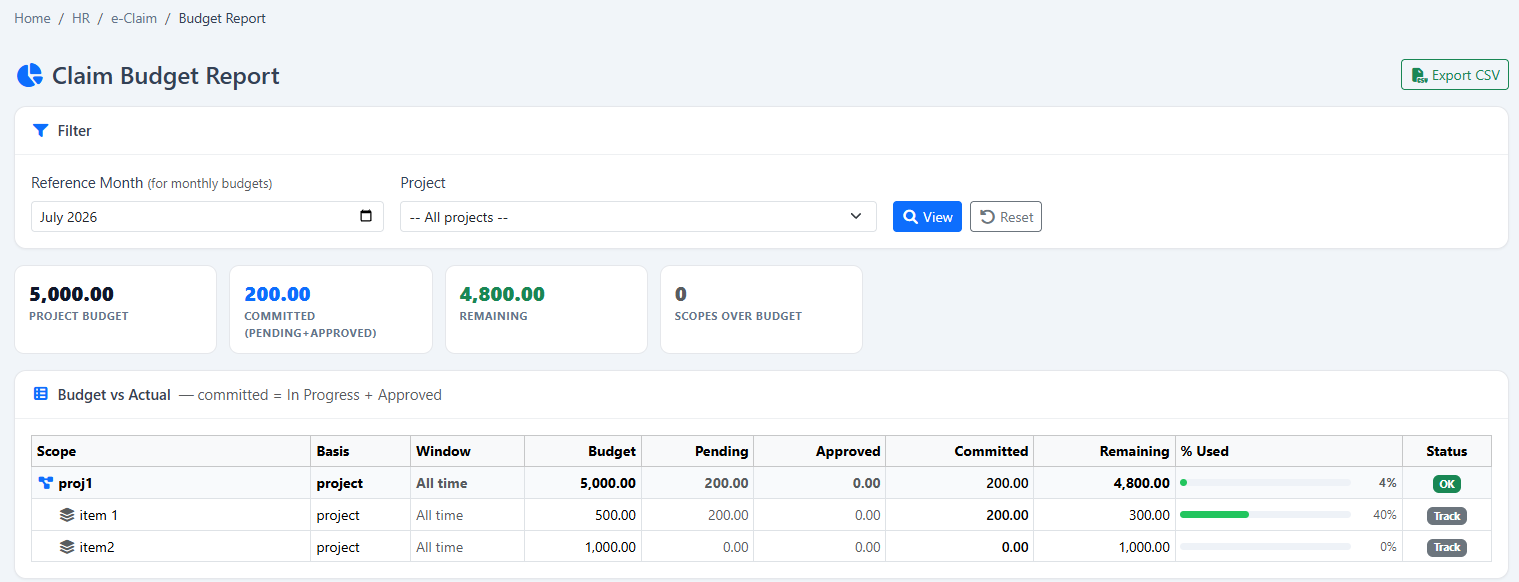
Besides employee convenience, management needs visibility. BMO HRM eClaim report helps summarise claim amount, quantity and claim count, with detail view for further checking.
Review the total amount submitted or approved by claim data for cost checking and monthly review.
View claim quantity summary to understand claim volume and repeated expense patterns.
Use visual summary such as claim amount and claim count chart for faster management review.
Open detail view to check claim type, amount, attachment and supporting information when needed.
Our team can guide your HR, finance and payroll users from claim policy setup to employee self service rollout.
Configure claim categories, income type mapping, default amount, GL account and attachment requirement.
Set claim cap by month or year according to employee type, department, position or internal company policy.
Set claim approval by employee and design multi-level approval using AND or OR approval logic where needed.
Enable claim to payroll mapping and auto claim payment so approved claim can display in payroll and payslip.
Guide managers on claim decision, attachment checking, claim policy viewing and approval status review.
Employees start submitting claims through web or BizCloud App, reducing paper claim forms and repeated HR follow-up.
Use these questions to answer common buyer concerns and improve search visibility for HR, finance and payroll decision makers.
Yes. Employees can submit claims from web access or BizCloud App where the eClaim module is activated and permission is given.
Yes. Claim type can be configured with “Need Attachment”, so employees must upload proof such as receipt or invoice before submission.
Yes. Claim cap can be enabled by month or year under employee type settings, helping the company follow claim policy more consistently.
Yes. Approvers can view claim detail, attachment, policy, approval table and decision status before approving or rejecting the claim.
Yes. Claim type can link to payroll income type, and approved claim amounts can display in payroll and employee payslip.
Yes. My e-Claim shows claim list, claim history, approval table, detail view, PDF form and status search.
Yes. Employees can clone claim details from previous applications, useful for repeated or similar monthly claims.
Yes. BMO HRM modules can be used separately or together, including e-Leave, Attendance, e-Claim, Payroll and Assessment.
Let our team show how BMO HRM eClaim Self Service helps employees submit claims faster, helps managers approve with clearer records, and helps payroll process approved claims with less duplicate entry.
Request eClaim Demo Start Free Trial